How to merge PDF files into one
A job application wants your CV, cover letter and certificates as one file. Your accountant wants every receipt in a single PDF. Either way, you need to merge.
It takes about a minute, and you can mix PDFs with Word documents and photos.
Choose files to mergeMerging your files
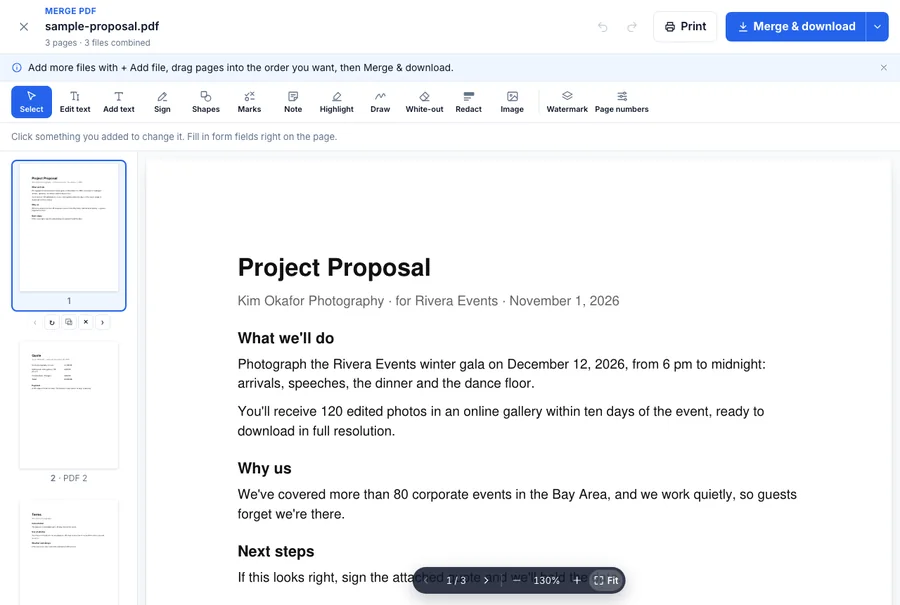
- Open Merge PDF on Dokkiman and choose your files. Select several at once by holding Cmd (Mac) or Ctrl (Windows). You can add up to 10, each up to 50 MB.
- Word documents and photos are turned into PDF pages as they come in.
- Drag the pages into the order you want. Turn any that are sideways, and remove the ones you don't need.
- Click Merge & download. You get one PDF with every page in that order.
While you're there
Merge opens in the same editor as the rest of Dokkiman's PDF tools, so you can add page numbers, a signature or a watermark to the combined file before you download it. That's handy for a set of documents someone has to sign or refer to by page.
What happens to your files
They're combined and sent straight back to you. We don't keep a copy unless you choose to save it to your Document Manager.
Common questions
- How many files can I merge?
- Up to 10 at a time, each up to 50 MB.
- Can I merge Word documents and photos?
- Yes. .docx files and JPG, PNG or WebP photos become PDF pages.
- Is it free?
- Yes, without an account.