How to make an invoice (free template)
You've finished the job and it's time to get paid. If you're freelancing and don't want accounting software yet, a clear PDF invoice does the job.
Here's what to put on it, and how to fill in our template in a few minutes.
Use this templateWhat an invoice needs
- Your name or business name, address and contact details.
- Your client's name and address.
- An invoice number. Number them in order (2026-001, 2026-002...) so you and your client can keep track.
- The invoice date and the due date. "Due in 14 days" is common.
- What you did, with an amount for each item, then the subtotal, any tax and the total.
- How to pay you: bank details or a payment link.
Filling ours in
- Open the invoice template and click Use this template.
- Fill in your details, your client's, the dates and up to six items with their amounts.
- Download it and email it, or send it for e-signature so your client approves it with a signature.
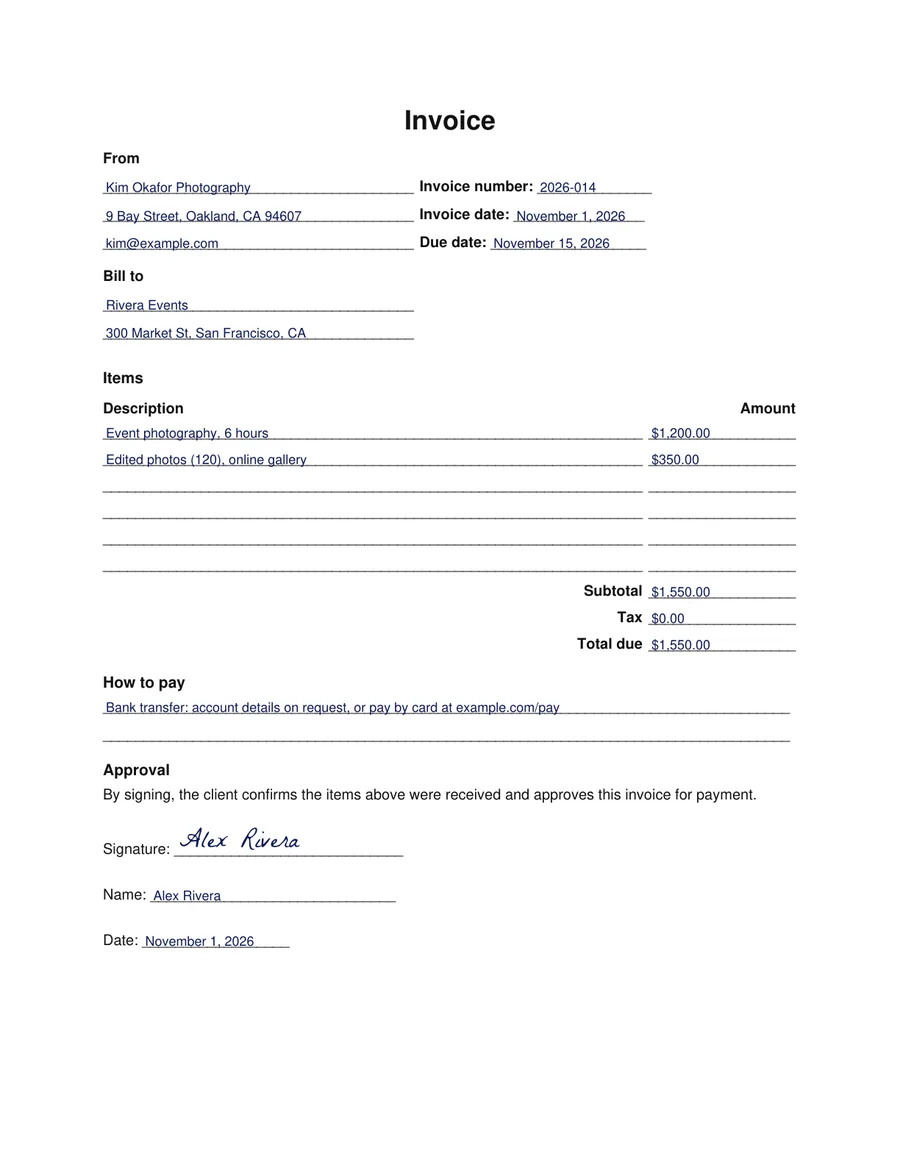
Why have the client sign it?
An approval signature gives you both a dated record that the work was accepted and the amount agreed. If payment is late, there's no debate about whether they said yes.
Common questions
- Is the template free?
- Yes, you can fill it in and download it without an account.
- How many items can I add?
- Up to six. For longer invoices, accounting software is a better fit.
- Do I have to charge tax?
- It depends on where you are and what you sell. Check your local rules, or ask an accountant.