How to fill out a W-4 in 2026
First week at a new job, and there's a W-4 in your onboarding pile. It decides how much federal income tax comes out of each paycheck.
For a lot of people it takes two minutes: name and address at the top, signature at the bottom. The steps in between only apply in certain situations, and this guide shows you how to tell whether yours is one of them.
Fill out this formFilling it out
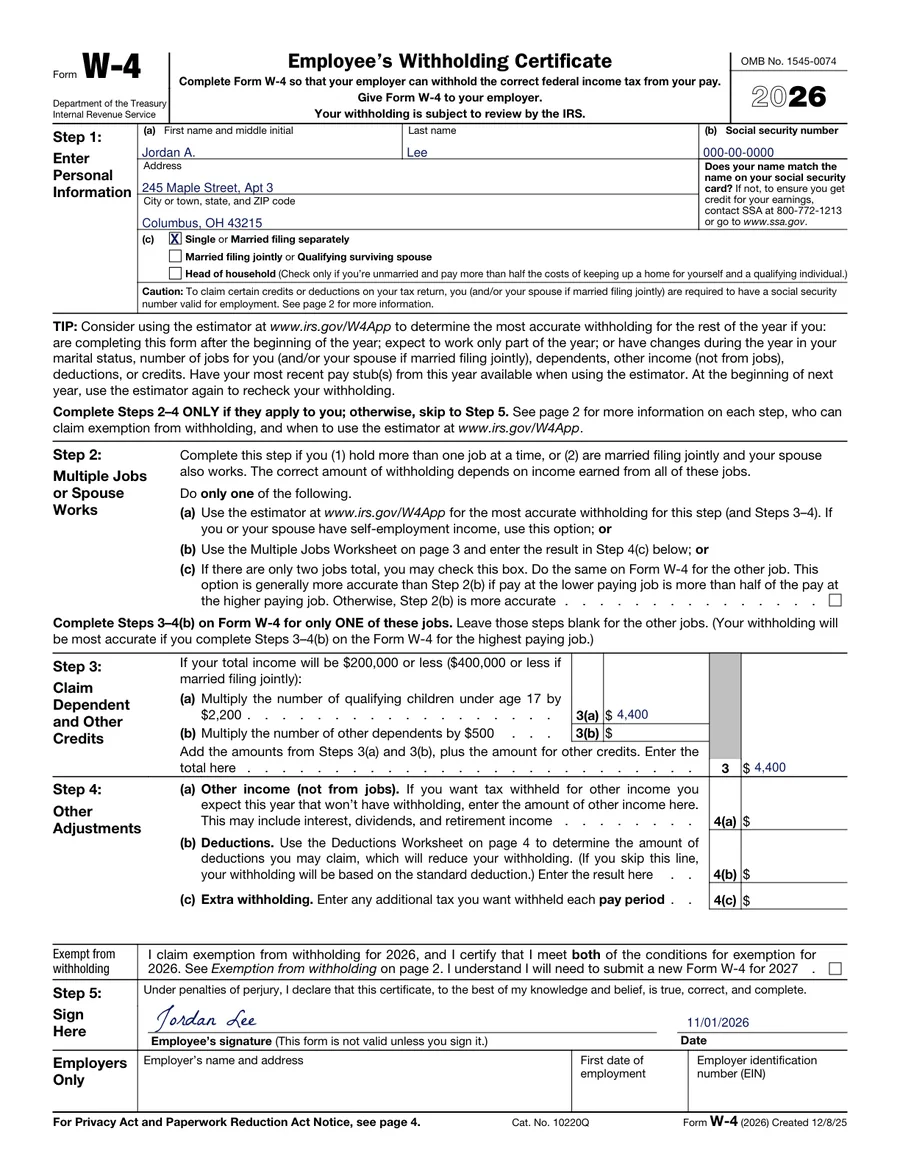
- Open the 2026 W-4 on Dokkiman and click Fill out this form. You can type straight into it, no account needed.
- Step 1 is your name, address, Social Security number and filing status. Pick one: single (or married filing separately), married filing jointly, or head of household.
- Step 2 is for two situations: you have more than one job at the same time, or you're married filing jointly and your spouse works too. If that's you, the IRS estimator at IRS.gov/W4App gives the most accurate answer. With exactly two jobs in total, you can just tick 2(c) on both W-4s.
- Step 3 is for anyone with dependents, as long as your income is $200,000 or less ($400,000 if married filing jointly). Each child under 17 counts for $2,200 and each other dependent for $500. Add them up and write the total on line 3.
- Step 4 is optional. Use it if you have income with no tax taken out (from investments, say), expect large deductions, or just want extra withheld each pay period.
- Sign and date Step 5, download the PDF and give it to your employer or HR. An unsigned W-4 doesn't count.
Can you skip most of it?
- Everyone fills in Step 1 and signs Step 5.
- One job, and you're single or your spouse doesn't work? Skip Step 2.
- No dependents, or over the income limit? Skip Step 3.
- Leave Step 4 alone unless you want to fine-tune things.
If you only do Steps 1 and 5, your employer withholds based on your filing status and the standard deduction. With one job and no kids, that tends to be close enough.
What about the exempt box?
There's a box just above Step 5 for claiming exemption from withholding. You can only use it if you owed no federal income tax last year and expect to owe none this year, and page 2 of the form spells out the rules. It doesn't carry over, either: you'd need a new W-4 for 2027.
Who gets it
Your employer keeps it. You don't send it to the IRS.
You can hand in a new one whenever life changes: you get married, have a baby, pick up a second job. If you got a surprise tax bill last spring, that's a good reason to redo it with the estimator too.
Common questions
- Do I have to fill in every step?
- No. Steps 1 and 5 are required. The rest only apply to some people.
- Does the W-4 go to the IRS?
- No, your employer keeps it.
- Can I sign it electronically?
- Most employers accept that. Ask HR if you're not sure.
- When should I fill out a new one?
- Any time your situation changes, or if your refund or tax bill was a lot bigger than you expected.