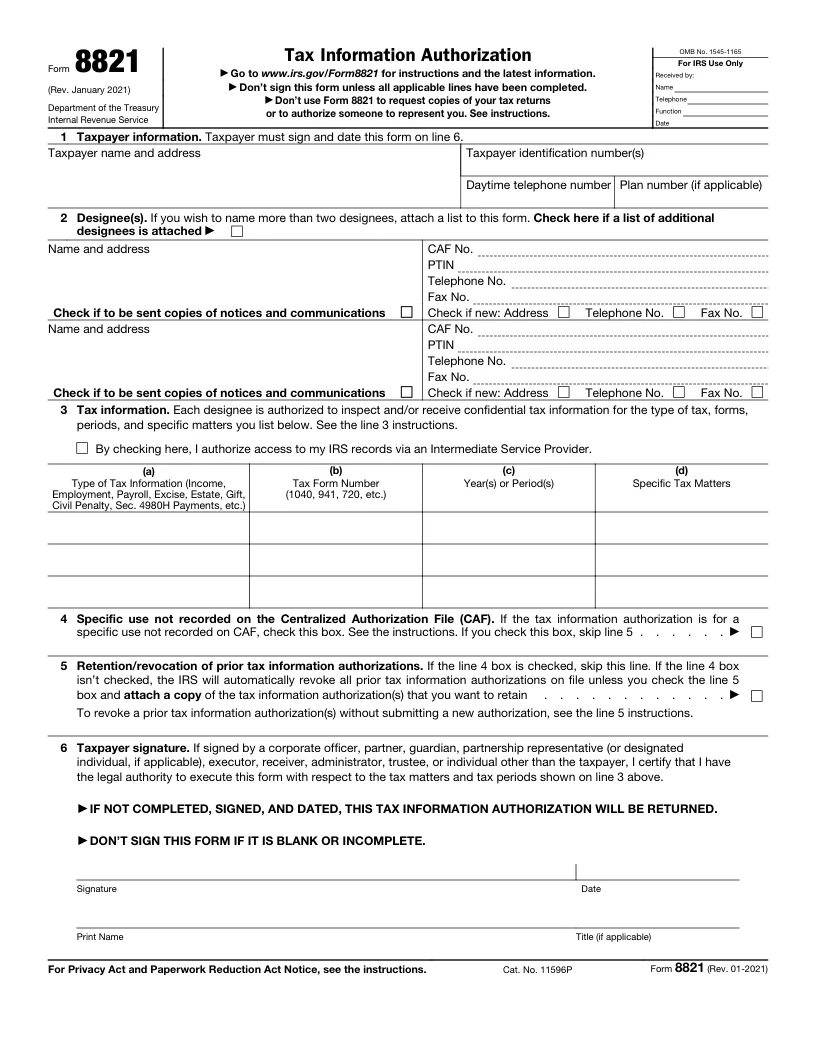
Form 8821 (tax information authorization)
Let a tax professional, lender or other person see your IRS tax information.
Opens in Edit PDF with a box on each blank, ready to type in. Sign it there too. No account needed.
- Signed by
- Taxpayer
- Pages
- 1
- Updated
- November 1, 2026
- Created by
- IRS (Rev. January 2021)
About this form
Form 8821 lets a person or organization the taxpayer names, the designee, see and receive their tax information from the IRS for the tax matters and years listed on it. Unlike Form 2848, it doesn’t let the designee represent the taxpayer or act for them.
You, the designee, fill in your details and the tax matters (lines 2 and 3) before sending. The taxpayer fills in the rest and signs. Taxpayer identification numbers are private fields: they’re in the signed form but hidden on the certificate of completion.
The IRS accepts electronically signed Forms 8821 only in certain ways. See IRS.gov/Submit8821 and the Instructions for Form 8821 before you send it.
This is IRS’s official form. Its pages are as published; Dokkiman’s fields take the place of its fill-in boxes. Check IRS’s website for the latest version and instructions.